
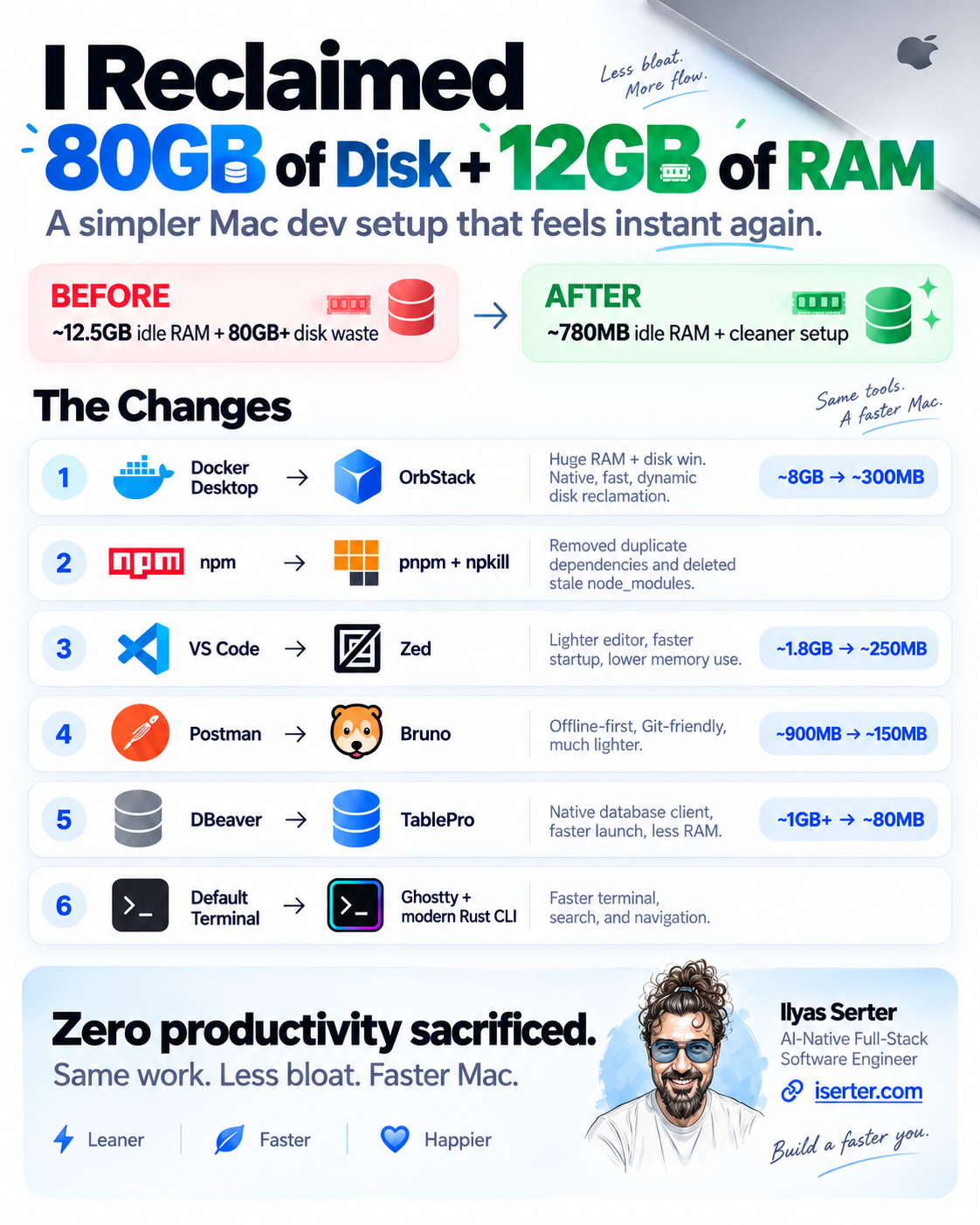
I Reclaimed 80GB of Disk, 12GB of RAM, and Made My Mac Feel Instant Again
I have been wanting to refine my tech stack and tools for a while, and the time has finally come. Here is what I saw in my Activity Monitor before the transition:
- Docker Desktop: A virtualized Linux beast holding 8GB of pinned RAM hostage and maintaining a 64GB
.rawsparse disk image that stubbornly refused to shrink. - VS Code: 12 helper processes, 1.8GB of RAM, and regular background file indexing spikes.
- Postman: An API client that somehow needed 900MB of RAM just to sit on an idle workspace while constantly nudging me to create a cloud team account.
- DBeaver: A JVM-heavy monolith taking 10+ seconds just to launch and inspect a single staging table.
- npm: Hundreds of projects holding duplicate copies of React, Next.js, and TypeScript across my local drive.
Having modern Apple Silicon machines with unified memory and incredible hardware video/compute pipes, only to bury them under layers of Electron, slow JVM wrappers, and unoptimized background daemon makes no sense.
So I finally tore down my setup and configured a new one .
I replaced every bloated tool with a lean, native, or terminal-first alternative:
- Docker Desktop -> OrbStack
- npm -> pnpm
- VS Code -> Zed
- Postman -> Bruno (not that I used Postman much… I’m a curl in terminal guy, but hey, I do need a GUI every once in a while)
- DBeaver -> TablePro
- Default Terminal -> Ghostty
- Legacy CLI tools -> Modern Rust tools (
rg,fd,zoxide,bat)
Then I purged the digital rot: cleaned out hundreds of stale node_modules folders using npkill and reclaimed gigabytes of container build caches.
Here is the kicker: I sacrificed zero productivity. Everything I need to build, test, and ship software is still right here. The difference is that my Mac now runs cool, launches every tool in milliseconds, and freed up roughly 80GB of disk space and 12GB of RAM.
Here is the exact blueprint of what changed, why it matters, and how you can do it too.
1. Virtualization: Docker Desktop -> OrbStack
Docker Desktop on macOS has always felt like a necessary compromise. It boots a heavy Linux virtual machine that locks away a fixed chunk of memory and stores containers inside a virtual disk file that expands freely but never shrinks on its own.
OrbStack completely changes this equation. It is written natively in Swift, boots in roughly two seconds, and uses dynamic memory allocation. If your containers aren’t doing anything, OrbStack gives that RAM right back to macOS. When you delete images or containers, it dynamically returns the APFS disk blocks.
Bash
# What I ran before making the switch to clean up stale container clutter:
docker system prune -a --volumes
docker builder prune -a
The Trade-off Comparison
| Dimension | Docker Desktop | OrbStack | The Practical Win |
| Startup Time | 15–30 seconds | ~2 seconds | Instant local service spins. |
| Idle Memory | 4GB–8GB (statically reserved) | ~150MB – 400MB | Releases unused RAM dynamically to macOS. |
| Disk Management | Fixed .raw virtual disk file; hard to shrink | Dynamic APFS reclamation | Disk space shrinks immediately when you delete images. |
| Architecture | Electron UI + Go/C++ virtualization | Native Swift + Apple Hypervisor | Smooth UI, no battery drain in the background. |
2. Package Management: npm -> pnpm + npkill Purge
Well, to be fairly honest, I switched to pnpm months ago, but it’s worth mentioning again and I have discovered npkill recently, which is a blessing for someone like me. If you have been coding for a few years, your drive is quietly rotting under the weight of orphaned node_modules directories. Every little tutorial, abandoned side project, and test repo has a 700MB folder sitting in silence.
First, I reclaimed immediate gigabytes using npkill:
Bash
npx npkill
This utility scans your entire directory tree, identifies every node_modules directory sorted by size, and lets you wipe them out one by one with a single press of the spacebar. I cleared tens of gigabytes in five minutes.
Second, I committed to pnpm globally:
Instead of dumping identical copies of lodash, typescript, or @types/node into every single project on your machine, pnpm stores all files in a single, hard-linked global content-addressable store.
The Trade-off Comparison
| Dimension | npm | pnpm | The Practical Win |
| Disk Strategy | Duplicates every dependency per project | Global content-addressable store (hard links) | Saves 60–80% of project disk usage across repos. |
| Install Speed | Sequential / moderate caching | 2x – 3x faster | Parallel execution; fast branch switches. |
| Dependency Strictness | Flat structure (allows phantom dependencies) | Isolated, non-flat symlink structure | Catches undeclared dependency bugs immediately. |
3. The Code Editor: VS Code -> Zed
VS Code is an exceptional platform, but it is built on Electron. Over time, as your workspace grows and language servers stack up, input latency creeps in and memory usage easily hits 2GB+.
I moved my primary daily driver to Zed.
Zed is written from the ground up in Rust and renders text using your Mac’s Metal GPU engine. It treats editing code like a high-performance game engine treats frame rates. Opening a 20,000-line file takes milliseconds, typing feels completely immediate (sub-5ms keystroke latency), and it consumes a tiny fraction of the memory.
I keep VS Code around as an on-demand fallback for rare, proprietary debugging tools. But for daily writing, refactoring, and feature shipping, Zed is a breath of fresh air.
The Trade-off Comparison
| Dimension | VS Code | Zed | The Practical Win |
| Engine | Electron (Chromium + Node) | Native Rust + Metal (GPU) | No browser bloat; 120Hz ProMotion text rendering. |
| RAM Footprint | ~800MB – 2.5GB+ | ~180MB – 350MB | Frees up unified memory for compilers and local services. |
| Startup Speed | 3–6 seconds | <150ms | Opens instantly from the terminal. |
| AI Integration | Extension-based | Built-in natively | Seamless support for Anthropic, OpenAI, or local models. |
4. API Testing: Postman -> Bruno
Postman used to be a lightweight tool for sending HTTP requests. Today, it requires an account, pushes cloud workspaces, syncs your local API secrets to remote servers, and runs on an Electron foundation that regularly consumes nearly a gigabyte of RAM.
I replaced it with Bruno.
Bruno is offline-first and Git-friendly. Instead of holding your API collections inside an opaque cloud database, Bruno saves them as simple, plain-text .bru files right inside your project repository.
- Your API specs live directly alongside your application code.
- You can version them with Git and branch them with pull requests.
- There is no cloud sign-in, no telemetry, and zero risk of leaking dev tokens to a third-party SaaS.
The Trade-off Comparison
| Dimension | Postman | Bruno | The Practical Win |
| Data Storage | Proprietary cloud sync / team workspaces | Plain-text .bru files in your Git repo | Version control collections alongside code. |
| Privacy & Auth | Account login required for core features | 100% Offline-first, no account required | Dev and staging secrets never leave your machine. |
| RAM Footprint | ~700MB – 1.2GB | ~120MB – 250MB | Minimal idle footprint; snappy performance. |
| Pricing | Aggressive paywalls on collection runs | Free & Open Source | No arbitrary restrictions on team runs. |
5. Database Management: DBeaver -> TablePro
DBeaver works, but it is built on the Eclipse Java framework. Launching it feels like firing up an entire operating system. It spikes CPU fans on startup, takes seconds to establish connections, and lingers in the background hogging system RAM.
I moved to TablePro, a 100% open-source, native macOS client written directly in Swift.
It starts in under a second, connects to PostgreSQL, MySQL, Redis, and SQLite with zero lag, and uses roughly 80MB of RAM. It gives you the clean, native feel of proprietary tools like TablePlus, but without the annoying 2-tab free-tier limitation.
The Trade-off Comparison
| Dimension | DBeaver | TablePro | The Practical Win |
| Architecture | Java Virtual Machine (JVM) | Native Swift / SwiftUI | Sub-second launch; clean macOS design language. |
| Idle Memory | ~800MB – 1.8GB | ~80MB | Drops database memory usage by ~90%. |
| License | Open Source (GPL) | Open Source (AGPLv3) | Free, fully open-source, and tab-unrestricted. |
| Supported DBs | Virtually all (JDBC drivers) | Postgres, MySQL, Redis, SQLite, etc. | Covers modern dev stacks natively. |
6. The Terminal & Shell: Ghostty + Modern Rust CLI
The terminal is where developers spend half their lives, yet most stick with Terminal.app or older wrappers that drop frames and crawl when searching text.
I switched my terminal emulator to Ghostty. Ghostty is written in Swift and Zig, using Metal shaders to deliver butter-smooth 120Hz text rendering with virtually zero latency.
Then, I swapped the 40-year-old POSIX tools for modern, multi-threaded Rust binaries:
grep->ripgrep(rg): Blazing fast; automatically respects.gitignoreso your CPU never wastes cycles indexingnode_modulesor build artifacts.find->fd: Simple, intuitive syntax and parallel directory traversal.cd$->zoxide: Learns your habits. Typez my-projectand jump straight there from anywhere on your drive.cat->bat: Built-in syntax highlighting, line numbering, and Git diff indicators in the gutter.
Bash
# Install the modern CLI suite in one pass:
brew install ghostty ripgrep fd zoxide bat
The Trade-off Comparison
| Legacy Utility | Modern Replacement | What You Actually Notice |
| Terminal.app / iTerm2 | Ghostty | 120Hz GPU-accelerated rendering; zero input lag; clean native macOS windowing. |
grep | ripgrep (rg) | 10x speedup; respects .gitignore out of the box. |
find | fd | Colorized output, faster search, sane flags (no -iname gymnastics). |
cd | zoxide | Teleport directly across directories without typing full paths. |
cat | bat | Immediate terminal syntax highlighting and Git modification hints. |
The Verdict: Fast, Light, and Frictionless
Here is what the shift looks like at a macro level:
Before:
[Docker Desktop: 8GB] + [VS Code: 2GB] + [Postman: 1GB] + [DBeaver: 1.5GB] = ~12.5GB RAM idle
+ Orphaned node_modules & sparse disk caches eating 80GB+ disk space.

After:
[OrbStack: ~300MB] + [Zed: ~250MB] + [Bruno: ~150MB] + [TablePro: ~80MB] = ~780MB RAM idle
+ Zero redundant dependencies via pnpm.
+ Total storage reclaimed: ~80GB.
For years, developer tooling has drifted toward convenience at the expense of efficiency. We accepted 2-second typing latency, fans spinning up on idle machines, and 500MB RAM allocations for basic text interfaces as the standard cost of doing business.
It doesn’t have to be that way.
By prioritizing native Swift/Metal frontends, Rust-powered developer tools, and clean offline architecture, my MacBook feels like a brand-new machine—fast, quiet, and completely unburdened.